JICMAIL Direct Mail data is now available in TouchPoints
1) Add JICMAIL Direct Mail to your media selection
You will find the three main categories of Direct Mail in the TouchPoints 2018 media list in MediaPlanner+:
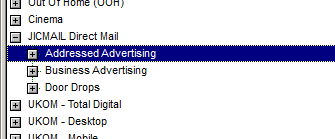
There are twenty entries, or lines, for each category. This is so you can set up multiple distinct campaigns.. for example you might use different weights of advertising, or different MOSAIC choices, in different regions.
2) Configure Your Direct Mail campaign
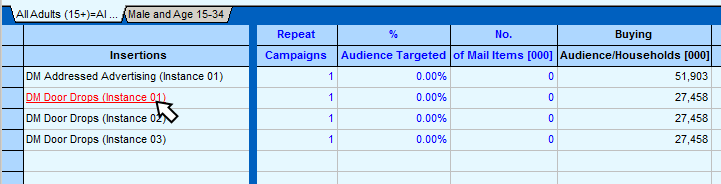
To configure your Direct Mail campaign, double-click on the name. The editor looks like this:
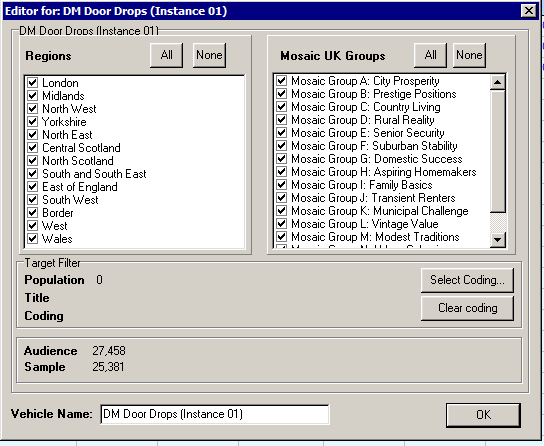
There are standard choices for ITV Area and MOSAIC UK Groups. In addition, you can use the ‘Target Filter’ to specify custom coding. As with Addressable Media, this allows you to use any TouchPoints coding to define a target group.
Important Note
- For Addressed Advertising (AA) and Business Advertising (BA) you can specify the type of people you are going to mail – perhaps to simulate a client’s mailing list
- For Door Drops (DD), remember you can only target household characteristics – so ‘ACORN Type’ or ‘Urban’ are fine, but not ‘Men’
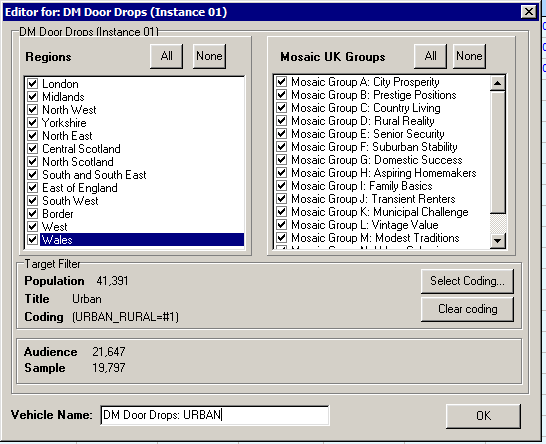
At the bottom of this screen you can type a memorable Vehicle Name for this custom setup. This will be saved, along with all your choices and coding, when you save a project file (MPFX).
3) Planning
Here is the Direct Mail layout in the main planning screen:
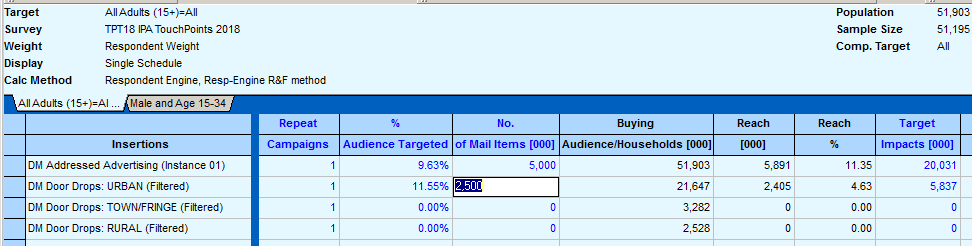
Start with Buying Audience/Households [000] – this is the AVAILABLE audience given the constraints of Region, Mosaic, and any filter coding you might have added. In this case, for example, there are 21.647m URBAN households. Note that these figures are the BUYING AUDIENCE and they don’t change with your planning target.
Important Note
- For Addressed Advertising (AA) and Business Advertising (BA) the figure given is the number of PEOPLE (51,903 = All Adults population, 000s)
- For Door Drops (DD) it is HOUSEHOLDS (21,647 = number of URBAN HH in GB, 000s)
You can choose to mail a percentage of the available audience (% Audience Targeted), or to send out a specific number of Mail Items. These two fields update each other. You can also use Repeat Campaigns to do the same mailing multiple times. Note there is a difference between mailing 20% of the target and mailing 10% of them twice: 2 x 10% will give you less reach and more frequency. If you do plan to mail 10% and then another 10% of the same group, you should summarise this by just inputting 20% in the first place.
- Reach [000] and % are the reach against the planning target. Note that particularly with AA/BA this often exceeds the number of Mail Items, as an individual Mail Item is usually shared with members of the same household. AA for example often exceeds 1.1 reach per mail item. This non-addressee overspill also means that if you send mail to (say) Men, some Women will also be reached.
- Note also that Target Impacts [000] is always much higher than Mail Items. This reflects the fact that once opened, mail is handled on average about 2-4 times, depending on category.
- Note that you can’t input the number of Impacts or GRPs directly, as it’s not a simple relationship with Mail Items.
As with all other TouchPoints Channel Planner media, the results of Direct Mail are combined with all other media choices to inform the total campaign reach and frequency.
